
Read · Listen · Speak
Each chapter has dialogue, vocabulary and grammar notes. Listen to a native voice, say the line yourself, and get feedback on your pronunciation. Pinyin and tones included.
Every Bookverse dialogue does three jobs on one screen: you read it, you hear it, you say it back. No separate reader, audio course, or speaking app.
Read — with help you control
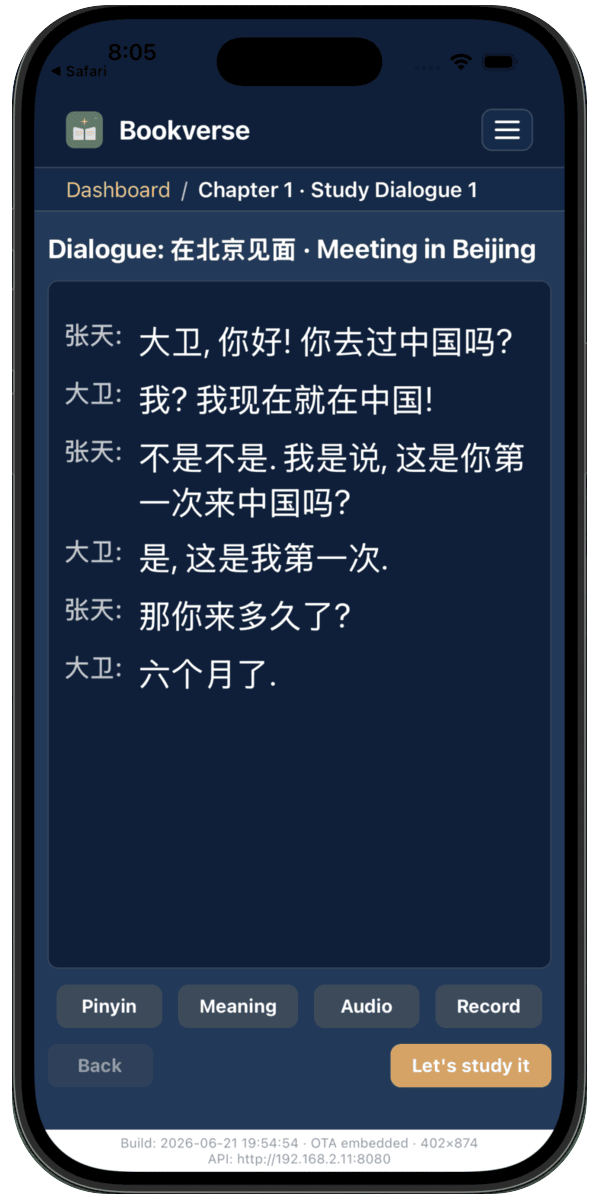
Chapters are built around dialogues: conversations between recurring characters, written for your level. The original text leads the screen. Everything else is one tap away:
- Pronunciation — pinyin for Mandarin, romanisation for Korean or Thai — hidden until you reveal it, so you practise reading the real script first.
- Meaning in your language, revealed per line or for the whole dialogue.
If the pinyin is always on, you are reading pinyin, not Chinese. So it starts hidden. Reveal it when you need it.
Listen — every line, distinct voices
Tap Listen and the dialogue is read aloud line by line, with a different voice per speaker. Audio is generated by the text-to-speech voices on your own device — nothing is streamed, and it speaks every language the platform supports. If your device is missing a voice, the app says so and the FAQ shows how to install one.
Speak — and see what was actually heard
The Speak button records you saying the line, transcribes what the recognizer actually heard, and lines it up word by word against the target. Matched words sit in place; missed or mangled ones are visible at a glance. There is no score out of 100 — you see the specific words that didn’t land, which is the thing you can actually practise.
On devices without on-device speech recognition for your course language, Bookverse falls back to cloud transcription automatically. Speaking practice works on phones where the usual apps give up.
Then study it
Read it, hear it, say it — then the same chapter’s words and lines go into review, and each line’s study steps follow the decode → understand → produce order. One chapter, no app-switching.