
Study what you've read
A study mode reinforces the words and phrases from the chapter you just read. No separate flashcard app to manage.
Learning a sentence takes three skills, in a fixed order:
- Decode — can you read สวัสดีครับ or 你好 at all?
- Understand — do you know what it means?
- Produce — can you say it so a listener recognises it?
Skip a step and the next one gets faked. “Knowing” the meaning of a line you can’t read is memorising its shape. “Speaking” a sentence you don’t understand is repeating audio. The progress bar moves; the skill doesn’t.
How Bookverse enforces the order
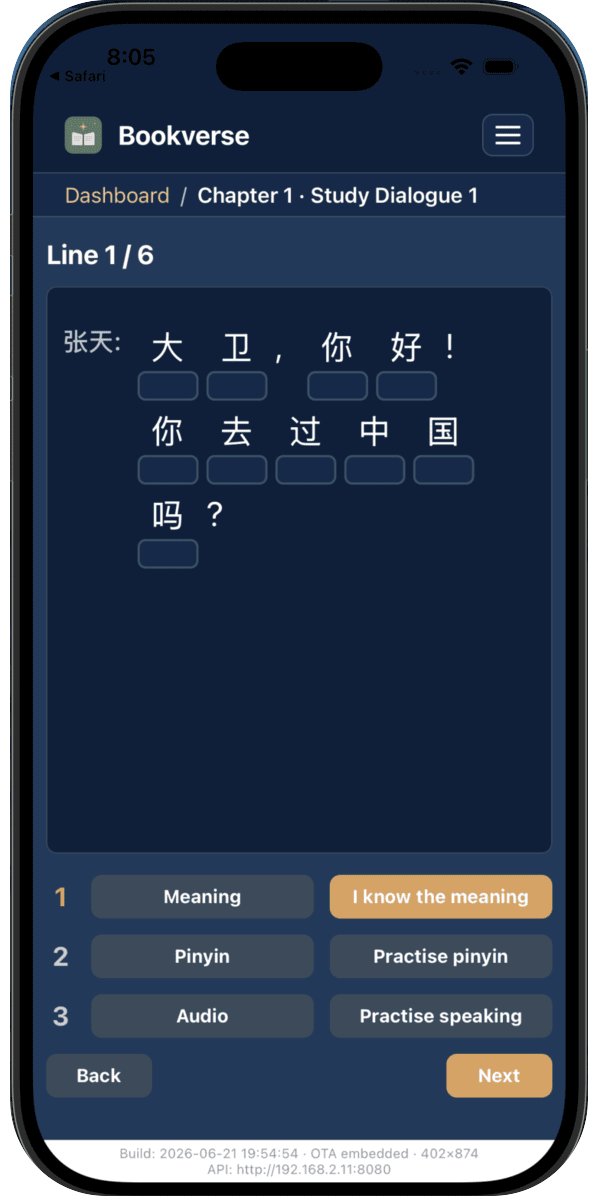
Every dialogue line in study mode walks the same three steps:
- Decode — the line appears in its real script. For Mandarin you type the pinyin character by character; for other scripts you work through the reading. No pronunciation crutch until you’ve done the work.
- Understand — reveal the meaning in your language and check yourself against it.
- Produce — say the line. The speech feedback shows word by word what a listener actually heard.
The Next button stays gated until the line’s steps are green — or until you explicitly choose to skip. Skipping is always available, but it is a visible choice. The app never pretends a step happened.
Why this order
Decoding without understanding is phonetics practice. Understanding without decoding keeps you dependent on romanisation. Producing without both is imitation.
Textbooks teach in this order. What a textbook can’t do is check each step — hear you, and show you what was heard. The app adds that part, and the review system decides when the line comes back.
What to expect
The first pass is slower than a tap-the-right-tile app. But when a chapter’s dialogue is green, you can read it, you understand it without the gloss, and you can say it so it’s recognised.